Device Code Phishing: How We Shut the Door for Good
No fake website, no stolen password, and the victim's own MFA is satisfied. Device code phishing is one of the most effective ways to take over a Microsoft 365 account today. Here is how it works, who is using it, and why it cannot succeed in a browser protected by Cybereinforce.
Most phishing has a weak spot you can train people to notice: a strange address, a login page that looks slightly off, a domain with one letter swapped. Device code phishing has none of that. Every page the victim signs in on is genuine Microsoft. That is exactly why it works so well, and why we decided to stop it in a completely different way.
How the attack works
Device code sign in was built for devices without a proper keyboard, like smart TVs or conference room systems. The device shows a short code, you open a Microsoft page on your phone or laptop, type the code, and sign in. The device is then logged in as you.
Attackers turned this around:
- The attacker requests a code from Microsoft for their own "device". It is just a script on their side.
- The lure arrives. A Teams meeting invitation, a shared document, a security check. It contains the code and a link to Microsoft's real device login page.
- The victim signs in on the real Microsoft page, types the code, completes MFA. Everything looks normal, because it is normal.
- Microsoft hands the session to the attacker. They can now read mail, Teams and SharePoint, and in some cases register their own device in your tenant so that later sign ins look trusted.
No password was stolen. No suspicious domain was visited. Your MFA did its job. And the attacker is in.
Who is doing this right now
This is not a theory. In February 2025 Microsoft Threat Intelligence published its research on Storm-2372, a group running device code phishing since August 2024 against governments, NGOs and companies in IT, defence, telecommunications, healthcare and energy across Europe, North America, Africa and the Middle East. Their lures were fake Microsoft Teams meeting invitations, often sent after building trust over messaging apps.
Around the same time, Volexity reported several Russian threat actors using the same technique, posing as officials from government ministries and international institutions to get their targets to "join a meeting". Since then the technique has spread well beyond state actors, because it is cheap, scalable and very hard to spot.
Why it is so hard to catch afterwards
Look at it from the SOC's side. The sign in log shows login.microsoftonline.com, MFA satisfied, a real user. If the attacker registered a device, later sessions even carry a device ID and the trust type you see on your own staff laptops. There is no malware and no lookalike domain to hunt for. By the time someone notices, the attacker may have been reading mail for days.
Our answer: stop the step, not the story
We stopped trying to recognise every lure. Lures change every day, and a meeting invitation can look like anything. What never changes is the page where the code gets typed in.
So Cybereinforce blocks Microsoft's device code sign in page in the browser, by default, for every customer. It does not matter whether the lure came by email, Teams, SMS, a QR code or a phone call. Whichever way the victim gets there, the page never opens. They see a block page, and the attacker's code simply expires.
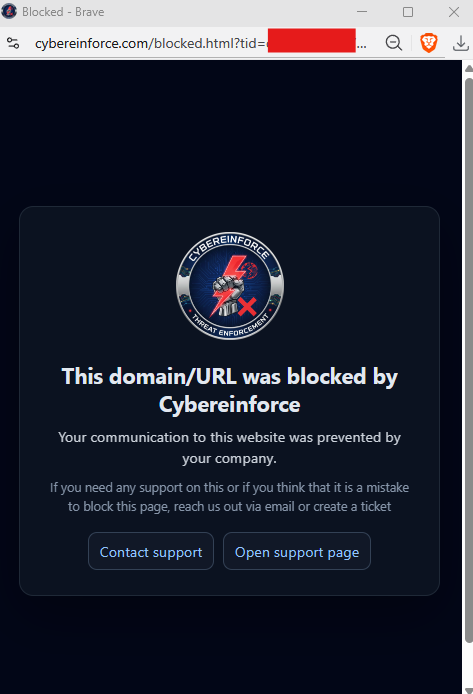
How you would be protected with Cybereinforce
- A device code attack cannot succeed in your browsers.* The sign in step is blocked before the victim can type the code.
- Nothing to configure. The protection is applied by the platform to every organisation from the first day. It does not use up any of your rule allowance, and nobody can delete it by accident.
- Copycat pages are covered too. Fake device login pages hosted on other domains are caught by our brand lookalike detection and our new domain protection.
- You see who was targeted. Every blocked attempt is logged with the user and the reason, so a lure that reached your staff becomes something your SOC can investigate.
- You stay in control. If a team ever has a genuine need for device code sign in in the browser, an administrator can allow that exact page.
We wrote a detailed walkthrough with screenshots of the whole attack on our Device Code Attacks page.
* In browsers protected by Cybereinforce. Administrators can allow legitimate device code sign ins for their organisation.